

What accessibility means for your organization

Accessibility is the practice of ensuring people with disabilities can use technology — websites, applications, documents, and services — with the same effectiveness as users without disabilities. Roughly 1 in 4 US adults (CDC, 2023) and over 1.3 billion people globally (WHO, 2023) live with some form of disability. For organizations, that’s the size of the audience you exclude when accessibility is missing or poorly executed.
Accessibility is also a legal requirement in most developed markets. In the United States, the Americans with Disabilities Act (ADA) covers public accommodations (Title III) and state and local government services (Title II); the DOJ’s April 2024 Title II Final Rule requires WCAG 2.1 Level AA compliance for state and local government websites and mobile apps; and the April 20, 2026 Interim Final Rule extended the original deadlines to April 26, 2027 (populations ≥50,000) and April 26, 2028 (under 50,000 plus special districts). The European Accessibility Act (EAA) has required private-sector compliance across EU member states since June 28, 2025. Canada’s Accessible Canada Act (ACA) applies to federally regulated entities with phased deadlines through 2028. See our US accessibility laws and international accessibility laws guides for full legal context.
The technical reference for all of these laws is the same: the W3C’s Web Content Accessibility Guidelines.
W3C’s Web Content Accessibility Guidelines
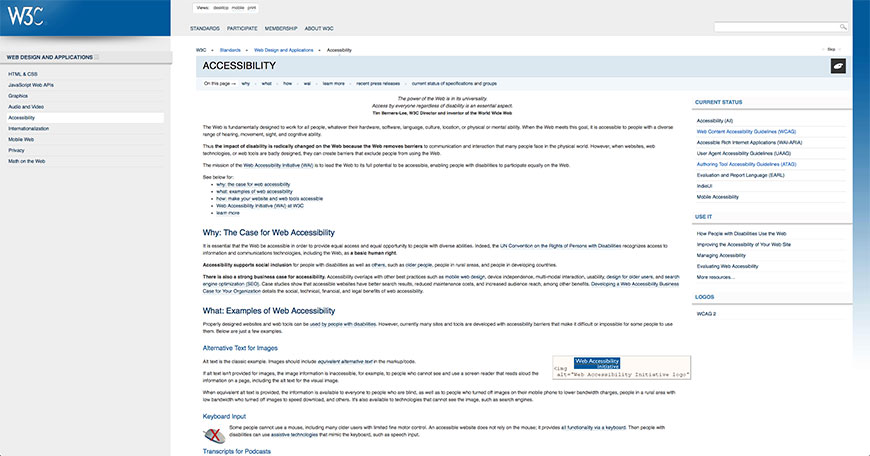
The W3C’s Web Content Accessibility Guidelines (WCAG) are the international standard for web accessibility, published by the W3C’s Web Accessibility Initiative. The current version is WCAG 2.2, published October 5, 2023. Version history:
- WCAG 2.0 (December 2008) — became an ISO standard (ISO/IEC 40500) in October 2012; still referenced by Section 508 since the 2017 refresh
- WCAG 2.1 (June 2018) — added 17 success criteria for mobile, low vision, and cognitive accessibility; referenced by the DOJ’s April 2024 Rule, the EAA, and EN 301 549
- WCAG 2.2 (October 2023) — added 9 success criteria including Focus Not Obscured, Target Size (Minimum), Consistent Help, Accessible Authentication, and Redundant Entry; backward-compatible with 2.1
WCAG is organized around four principles, summarized as POUR: Perceivable, Operable, Understandable, Robust. Each principle has multiple guidelines and testable success criteria at three conformance levels: A (minimum), AA (standard target for most laws), and AAA (enhanced).
For organizational compliance, Level AA is the practical target. Adopting WCAG 2.2 AA satisfies WCAG 2.1 AA automatically (the 2.2 criteria are additions, not changes), positioning the organization to meet both current and forward-looking regulatory references.
1. Planning
An accessibility plan needs executive ownership, formal policy, public visibility, realistic timelines, and consistent incentives. Without all five, accessibility tends to stall as a side initiative rather than become an organizational practice.
Executive sponsorship
Decisions about accessibility are organizational decisions, and they need leadership backing to get traction across departments. Major universities (Penn State, MIT, Stanford) and most regulated enterprises designate a senior administrator — often a Chief Accessibility Officer, VP of Administration, or General Counsel — as the accountable steward. Plans driven from the top reach further than those driven from individual contributors.
Formal policy
Informal commitments don’t change organizational behavior. Accessibility belongs in written, board-approved policy with explicit scope (which properties are covered), standards (which version of WCAG, which conformance level), and enforcement mechanisms. Policies should reference your jurisdiction’s relevant statutes — ADA, Section 508, EAA, ACA, AODA — and should be revisited annually as standards and laws evolve.
Public visibility
Make the policy public. Most regulated organizations publish an accessibility statement on the website that links to the policy, lists the conformance target, identifies a contact for accessibility complaints, and reports progress. The EAA explicitly requires accessibility statements for covered services; even where not required, public visibility creates accountability. Successes and failures both belong in the public progress reports.
Realistic timeline
For a medium-complexity organization starting from a non-compliant baseline, a realistic 18-month implementation timeline:
- Months 1–3: baseline accessibility audit of current digital properties; document scope and gaps.
- Months 3–6: integrate accessibility requirements into procurement processes for IT equipment, software, and services.
- Months 6–12: remediate the highest-traffic/highest-risk pages (typically homepage, signup, checkout, contact, top-level navigation).
- Months 12–15: extend remediation to ~95% of public-facing content.
- Months 15–18: complete remaining content (PDFs, archived materials), establish ongoing monitoring and CI integration.
Adjust scope based on organization size, regulatory deadlines, and complexity. Government entities subject to the DOJ Title II rule should align their timelines with the April 2027 / April 2028 deadlines; EAA-covered private sector entities should target the June 2025 enforcement floor (already past) plus ongoing compliance.
Incentives and accountability
Plans without consequences don’t drive behavior change. Tie accessibility metrics to performance reviews for product, design, engineering, and content teams. Link procurement spend to accessibility verification (no purchase order without accessibility documentation). Recognize teams that ship accessible features publicly. The exact mechanism matters less than its consistency — apply the same standard to every team.
2. Locating Origin: where you actually stand
Once a plan is in place, find out where the gaps are. Three complementary methods together produce a complete picture.
Accessibility audit
An accessibility audit systematically reviews your digital properties against the chosen standard (typically WCAG 2.2 AA). Options:
- External audit firms — Deque, Level Access, TPGi, Sucuri, Siteimprove, and others provide third-party audits. Common for compliance documentation and regulatory submissions. Cost: $5,000–$50,000+ depending on scope.
- Internal audit using WCAG checklists — the WCAG Quick Reference and WebAIM’s checklist are free and authoritative. Practical for organizations with internal accessibility expertise.
- Free remote audit tools — WAVE by WebAIM provides automated overlay-style testing with detailed reports.
Audits should output specific findings tied to specific WCAG success criteria, prioritized by severity, with proposed remediation steps.
Manual accessibility testing
Automated tools catch 30–50% of WCAG issues; the rest requires human judgment. The high-impact manual tests:
- Keyboard-only navigation — unplug the mouse and verify every function works via Tab, Shift+Tab, Enter, Space, Arrow keys, and Esc. The single highest-signal test.
- Screen reader use — NVDA (free, Windows), VoiceOver (built-in, macOS/iOS), TalkBack (Android). Twenty minutes on key workflows reveals issues automated tools miss.
- Zoom testing — 200% (WCAG 1.4.4) and 400% (WCAG 1.4.10 Reflow) confirm content remains usable at higher magnification.
- Forced Colors Mode — Windows 11’s Contrast themes (or DevTools emulation) catches color-dependent UI that breaks under user overrides.
- User testing with people who have disabilities — the gold standard. Services like Fable, Applause, and UserTesting.com provide accessibility-focused panels.
See our manual accessibility testing guide for a detailed walkthrough.
Automated testing
Automated testing complements manual testing — it doesn’t replace it. Useful tools:
- axe DevTools (browser extension; free tier) — detailed issue reports tied to WCAG success criteria.
- WAVE (WebAIM, browser extension) — visual overlay marking issues directly on the rendered page.
- Lighthouse (built into Chrome DevTools) — accessibility audit using axe-core.
- Pa11y (CLI tool) — useful for CI pipeline integration.
- Siteimprove, Monsido, Tenon, Deque axe Monitor — enterprise-grade continuous monitoring.
Run automated checks on every deploy via CI to catch regressions before they ship. Combine the output with manual test findings to produce the full picture.
Beware accessibility overlays
One category of “accessibility tool” worth flagging: accessibility overlays — JavaScript widgets sold by accessiBe, UserWay, AudioEye, EqualWeb, and similar vendors that promise instant compliance. Independent testing has consistently shown these widgets do not deliver promised compliance, and a substantial share of recent ADA Title III lawsuits target sites that had an overlay installed. The FTC’s January 2025 consent order against accessiBe (a $1 million fine plus a ban on deceptive performance claims) formalized what accessibility practitioners had said for years: overlays are a marketing claim, not remediation. Build genuine accessibility into the underlying site rather than relying on an overlay layer.
3. Training staff
Accessibility competence has to live in the people who design, build, write, and maintain digital products. Common training tracks:
- Designers — color contrast, focus indicators, target size, accessible component patterns, content hierarchy. WCAG visual design training plus practice with low-vision and screen-magnifier scenarios.
- Front-end engineers — semantic HTML, ARIA correctness (and when not to use ARIA), keyboard interaction patterns, focus management for SPAs, accessible component libraries.
- Content authors and editors — alt text, heading hierarchy, descriptive link text, plain-language writing, accessible documents (PDF, Word, Office).
- QA and testing — manual keyboard testing, screen reader testing, automated tooling integration into the test pipeline.
- Product and project management — accessibility as a product requirement, regulatory landscape, vendor evaluation, roadmap prioritization.
For formal training and certification, the IAAP’s CPACC, WAS, CPWA, and ADS credentials are the industry standard. Deque University is a widely-respected paid platform with role-based courses. The W3Cx Introduction to Web Accessibility course on edX (free to audit) is a solid entry point. The DHS Trusted Tester program is a free US government certification specifically for Section 508 compliance work. See our accessibility certifications guide for full coverage.
4. Procuring accessible technology
Most organizations deploy software they didn’t write. Procurement is where accessibility either gets enforced or gets bypassed.
Accessibility Conformance Reports (ACR)
The VPAT (Voluntary Product Accessibility Template), now formally the Accessibility Conformance Report (ACR), is the industry-standard format vendors use to document conformance with US Section 508, WCAG, and EN 301 549. The current version is VPAT 2.5 (published 2024 by ITI) with editions for Section 508, WCAG 2.x, EN 301 549, and an “international” version covering all three. Demand a current ACR from any vendor whose software your organization purchases.
Procurement language
Build accessibility requirements into RFPs, contracts, and vendor master agreements. Standard clauses should require:
- WCAG 2.2 (or 2.1) Level AA conformance for web-delivered software
- Section 508 conformance for products sold to US federal agencies (or affiliates of such agencies)
- EN 301 549 conformance for products sold to EU public-sector entities
- A current ACR/VPAT delivered with the proposal
- Vendor commitments to remediate identified gaps within agreed timeframes
- Right to test the product for accessibility prior to acceptance
- Modification rights — the buyer can adapt the product for accessibility if needed
For mature procurement programs, vendors who can’t provide a current ACR are excluded from competitive bidding. This is the strongest single lever organizations have to push the broader software market toward accessibility.
5. Maintaining accessibility
Compliance is an ongoing practice, not a one-time achievement. New content, new features, third-party scripts, and design changes all introduce regression risk. Maintenance practices:
- Automated checks on every deploy — CI integration via Pa11y, axe-core, or similar catches regressions before they reach production.
- Quarterly manual audits on critical paths (homepage, signup, checkout, contact, top-traffic content).
- Annual third-party audit for compliance documentation and an outside perspective.
- Accessibility statement kept current — link to the conformance report, name the standard, identify the contact for complaints, and update the date.
- Complaint and feedback channels staffed and responsive — accessibility issues reported by users get logged, prioritized, and resolved within stated SLAs.
- Standards monitoring — subscribe to W3C WAI announcements, watch for WCAG 3.0 development, track relevant national legal updates (DOJ rules, EAA enforcement actions, EU member state implementations).
United States
The ADA (1990, amended 2008) is the primary US framework. Title III covers public-facing businesses; Title II covers state and local government. The DOJ’s April 2024 Title II Final Rule requires WCAG 2.1 AA conformance for state/local government websites; the April 20, 2026 IFR extended deadlines to April 26, 2027 (populations ≥50,000) and April 26, 2028 (under 50,000 and special districts). Section 508 applies to US federal agencies and contractors, referencing WCAG 2.0 AA since the 2017 refresh. HHS’s May 2026 Section 1557 deadline for health programs receiving federal funds was not extended by the DOJ IFR and remains in force. State laws (California Unruh Act, Colorado HB21-1110, NY Human Rights Law) add additional layers.
Canada
The Accessible Canada Act (ACA) of 2019 (Royal Assent June 21, 2019; in force July 11, 2019) applies to federally regulated entities. The Accessible Canada Regulations (SOR/2021-241, December 2021) phased compliance deadlines from 2022 through 2028 depending on entity type and content category, with web/mobile/digital document compliance falling on December 5, 2027 or December 5, 2028. The technical standard is CAN/ASC-EN 301 549 (WCAG 2.1 AA). Penalties reach $250,000 per violation. Provincial laws — most prominently Ontario’s AODA (2005) — add additional requirements for provincially-regulated entities.
European Union and the EAA
The European Accessibility Act (Directive 2019/882) has required private-sector compliance since June 28, 2025. Covered services include e-commerce, banking, e-books, electronic communications, audiovisual media, and elements of passenger transport. The technical standard is EN 301 549, currently referencing WCAG 2.1 AA. National implementations vary (Germany’s BFSG, France’s RGAA-aligned law, Italy’s Stanca Law extension, etc.) but all reference EN 301 549. Penalties vary by member state but reach into millions of euros for serious violations. Any organization selling products or services to EU consumers may be subject to EAA requirements regardless of where the organization is based.
Frequently asked questions
What WCAG level should our organization target?
Level AA is the practical compliance target — required by virtually every relevant law (DOJ Title II, EAA, EN 301 549, Section 508). Targeting WCAG 2.2 AA satisfies 2.1 AA automatically and positions the organization for forthcoming regulatory updates that reference 2.2.
How long does organization-wide accessibility implementation typically take?
For a medium-complexity organization starting from a non-compliant baseline, plan on 12–24 months for substantial WCAG 2.2 AA conformance across major properties. Government entities subject to the DOJ Title II rule have until April 2027 / April 2028 (post-IFR); EAA-covered private-sector entities should already be in compliance as of June 28, 2025.
What does a realistic accessibility budget look like?
Highly variable. A small organization (single site, single internal team) might spend $20,000–$100,000 on initial remediation plus 10–20% of ongoing engineering time on accessibility maintenance. A large enterprise with dozens of properties, multiple vendors, and regulatory exposure across multiple jurisdictions can spend $1M+ annually. The cost of not being accessible — lawsuits, regulatory fines, lost market share — is consistently higher.
Can our organization use accessibility overlays for compliance?
No. The FTC’s January 2025 consent order against accessiBe formalized that overlays are not a valid compliance strategy. Overlays do not fix underlying code, are sometimes named in litigation as themselves contributing to accessibility barriers, and have lost credibility with disability rights organizations and federal regulators. Build genuine accessibility into the site itself.
What’s the highest-impact first move?
Run an automated accessibility scan (axe, WAVE, or Lighthouse) plus one round of keyboard-only navigation testing on critical paths — homepage, signup, checkout, contact. Together these surface the majority of issues. Prioritize remediation by severity and user impact, then build in continuous monitoring as you remediate. The single most expensive accessibility mistake is treating it as a one-time project rather than an ongoing practice.
Bottom line
Organizational accessibility compliance in 2026 is a five-step practice: plan with executive backing, audit where you stand, train the people who build, procure accessible technology, and maintain through continuous monitoring. The legal landscape (DOJ Title II Rule, EAA, ACA, parallel national statutes) sets the floor; WCAG 2.2 Level AA defines the technical bar; and the practical work happens in the day-to-day decisions made by designers, engineers, content authors, and procurement teams across the organization. Compliance done well makes the organization legally safer, more inclusive, and — because most accessibility improvements are also usability improvements — more effective for every user. Compliance done poorly produces overlays, lawsuits, and remediation costs that dwarf what the work would have cost done properly the first time.