

What is pagination?
Pagination splits a long list of content across multiple linked pages, usually with a numbered navigation bar at the bottom (1 2 3 … 10 Next). Each page is a distinct URL — /shoes?page=2, /shoes/page/2/, or similar — and each is independently indexable by search engines. The user knows how far they are through the set, can jump to a specific page, and can bookmark or share a position in the sequence.

Pagination works particularly well when users have a goal — comparing options on an e-commerce site, looking up a specific article in an archive, scanning a long list of forum threads. Google’s own search results use pagination for exactly this reason: the user wants to find something, not to consume an endless feed. Amazon, eBay, Zillow, and most large marketplaces still use paginated category pages (with filters stacked on top) for the same reason.

What changed about pagination SEO in 2019
For most of the 2010s, Google recommended adding <link rel="next" href="..."> and <link rel="prev" href="..."> tags in the HTML <head> of each paginated page to help the crawler understand the sequence. This is no longer the guidance. In March 2019, Google’s John Mueller confirmed publicly that the search engine had stopped using those hints “a few years” earlier — meaning the signal had already been irrelevant since roughly 2016. Google’s current pagination documentation no longer mentions rel="next"/rel="prev" at all.
That does not mean removing them breaks anything — other crawlers (Bing in particular) still use them, and they remain valid HTML. But Google relies on ordinary <a href> links between paginated pages to discover the sequence. If your Next button is a real anchor tag pointing at the next page, Google can crawl your series. If it is a JavaScript click handler with no underlying URL, it cannot.
What is infinite scroll?
Infinite scrolling loads additional content automatically as the user reaches the bottom of the viewport — usually via JavaScript and an IntersectionObserver that fires a fetch request when a sentinel element scrolls into view. There is no pagination bar, no page-load interstitial, and often no footer the user can reach. Twitter/X, Instagram, TikTok, Pinterest, Facebook, and virtually every modern social feed use this pattern because the product goal is engagement over discovery — the user is meant to keep scrolling indefinitely.

Infinite scroll has two well-known problems for SEO and usability:
- Crawlers don’t scroll. Googlebot renders pages using a headless Chromium-based renderer, but it does not simulate user scrolling to the bottom of an infinite feed. If your additional content only appears after a scroll event, Googlebot will only see the first batch. Anything below the fold that loads via scroll is effectively invisible to search.
- Footer access breaks. As soon as the user approaches the footer, new content loads and pushes the footer back down, making it impossible to reach. Every item of navigation, trust signal, and link you put in the footer becomes dead weight.
The third option: Load More buttons
The Load More button sits between pagination and infinite scroll and has quietly become the 2020s default for content-heavy sites that want engagement without sacrificing SEO. The pattern: display the first batch of content, then a button at the bottom that fetches the next batch when clicked. Paired with history.pushState() so each load updates the URL (/articles?page=2, /articles?page=3), you get the best of both worlds — a fluid scroll experience and discrete, crawlable URLs for each state.
This is what Google explicitly recommends in its Pagination Best Practices for Google guide: implement pagination with real URLs for each component page, whether those URLs are navigated via numbered buttons, Next links, or a Load More interaction. A user clicking Load More sees a seamless experience; a crawler (or a user with a direct link) sees a clean, indexable page.
Which is better for SEO in 2026?
For most use cases, pagination or a Load More hybrid outperforms pure infinite scroll for SEO. The reasons:
- Discoverable URLs. Each paginated page is a distinct URL that Googlebot can crawl and rank. Deep links from page 5 of your archive can accumulate backlinks and rank for their own long-tail queries. Infinite scroll collapses the entire archive into one URL.
- Core Web Vitals. Pagination produces predictable, fixed-size pages — consistent LCP, stable CLS, and a bounded DOM. Infinite scroll accumulates DOM nodes as the user scrolls, inflating memory use and often triggering layout shifts when new content inserts above scroll position. Sites with aggressive infinite scroll commonly see CLS regressions and mobile INP degradation.
- Crawl budget. For large sites (covered in more depth in our crawl budget guide), paginated URLs let Googlebot fetch content in manageable chunks with cacheable responses. Infinite scroll endpoints that return different content each request are harder to crawl efficiently.
- Ranking diversity. An e-commerce category with 20 paginated pages has 20 URLs that can rank for variations like “shoes page 5” or long-tail product combinations. The same category with one infinite-scroll URL has one shot.
The one case where infinite scroll is genuinely right is when the product is the feed — Instagram, TikTok, Twitter/X, a live chat log — and SEO is not a primary traffic source. If users reach your content through the app or social shares rather than search, and the individual items are short-form (images, posts, videos), infinite scroll matches user expectations and there is nothing worth paginating for Google.
How to make infinite scroll search-friendly
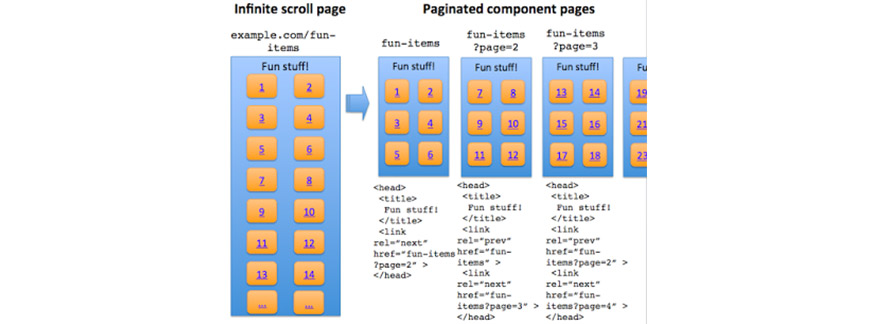
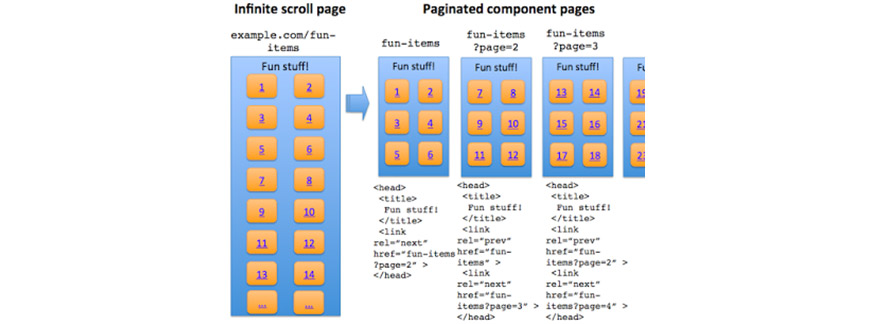
If you must use infinite scroll for a content-heavy site, follow Google’s official recommendation: build a paginated shadow structure underneath it. The visible experience is scroll-driven, but every state of the scroll corresponds to a crawlable URL with its own content.
- Chunk the content into component pages. Decide how many items belong on each page — typically 20 to 50 for product listings, 10 to 20 for article archives. The page size should yield a reasonable LCP under 2.5 seconds on a slow mobile connection.
- Give each component page a full, canonical URL. Use query parameters (
?page=2) or path segments (/page/2/); both work. Each URL must return the same content if loaded directly as it shows when the user scrolls to that position. Don’t use time-based or session-scoped parameters that change the set unpredictably. - Use
history.pushState()(orreplaceState) as the user scrolls. Update the URL in the address bar as the user crosses into each new section so direct bookmarks land on the correct state. This is the pushState pagination pattern, and it is the mechanism behind almost every SEO-friendly infinite scroll in production today. - Server-render or pre-render the component pages. When a crawler (or a user with a direct link) requests
?page=3, the server must return HTML that already contains the page-3 items — not an empty shell waiting for client-side JavaScript. Framework-level tools like Next.js getStaticProps / getServerSideProps, Nuxt’s asyncData, Astro’s static rendering, or plain server templates all solve this. - Include real
<a href>links between component pages. Even if the user experience is pure scroll, the HTML should include Previous/Next anchor tags in the rendered output so Googlebot follows them. Hide them visually if you must, but keep them in the DOM. - Self-reference canonicals. Each component page uses a
<link rel="canonical">pointing at itself — not at page 1. Pointing every paginated URL at page 1 tells Google the other pages are duplicates and kills their ability to rank. - Do not
noindexpaginated URLs or block them inrobots.txt. This is one of the most common pagination mistakes. If Googlebot cannot crawl page 2, it cannot follow links from page 2 to the individual items (products, articles) beneath. You lose discoverability of everything past the first page. - Test out-of-bounds behavior.
?page=9999should return a 404 (or a clean “no more results” page with a 200, but not the same content as page 1 — that creates duplicate-content issues at scale).
UX details that matter for both
Regardless of which pattern you choose, a few interaction details separate a working implementation from a frustrating one:
- Show a loading indicator. When more content is being fetched, a skeleton or spinner tells the user it is not a dead page. Silent loading on a slow connection looks broken.
- Preserve scroll position on back navigation. If a user clicks through to a product and hits back, they should land at their previous position in the list, not at the top. Modern frameworks handle this by default; vanilla implementations need to save scroll offset against the URL state.
- Keep the footer reachable. For infinite scroll, the easiest fix is a footer that pins to the viewport bottom or a Stop loading / see footer button after a fixed number of batches.
- Announce new content to assistive tech. Use
aria-live="polite"on the container that receives new items. Screen reader users otherwise have no signal that the list has grown. - Lazy-load images in the batch. Use
loading="lazy"on off-screen images so the first load is fast and the browser fetches images as they approach the viewport. This is native in every evergreen browser since 2020.
Decision framework
A rough rule of thumb:
- Product listings, category pages, article archives, blog indexes: paginate or use Load More with pushState. SEO matters here; distinct URLs win.
- Social feeds, chat messages, short-form video, discovery-style UIs: infinite scroll is fine. SEO is secondary to engagement, items are short, and users reach you through channels other than search.
- Search results on your own site: pagination is still the standard. Users want to evaluate options; endlessness works against that task.
- Long-form reading experiences: neither — keep articles on a single URL, use anchor links for navigation within, and let the user close the tab when finished.
Frequently asked questions
Is rel=”next” and rel=”prev” still useful in 2026?
Google no longer uses them — confirmed by Google’s John Mueller in March 2019, reflecting a change that had already been in place for years. Bing and a handful of other crawlers still honor them, so keeping the markup is harmless, but adding it for Google’s benefit specifically provides no ranking or indexing signal.
Does infinite scroll hurt Core Web Vitals?
Often, yes. Infinite scroll pages accumulate DOM nodes as the user scrolls, which inflates memory use and can degrade Interaction to Next Paint (INP) — the Core Web Vital that replaced FID in March 2024. Dynamically inserting content above the current scroll position causes Cumulative Layout Shift (CLS) regressions. Well-implemented infinite scroll (virtualized list, DOM recycling, stable content dimensions) can avoid both, but most off-the-shelf implementations trip at least one.
Should I paginate category pages on a small e-commerce store?
If you have under about 20 products per category, no — show everything on a single page. Pagination adds complexity and crawl surface for no user benefit at that size. Above roughly 20–30 items per category, paginate or Load More so the initial page loads fast. The page speed impact of loading 200 products at once is usually worse than the SEO cost of paginating them.
What about “View All” pages?
Google still supports the View All pattern — a single canonical page showing every item, with paginated “partial” pages canonicalizing to the View All. It works well for moderately sized sets (up to a few hundred items) where a single-page view loads acceptably fast. For very large sets, paginate instead; a 5,000-item View All will fail Core Web Vitals on mobile no matter how well it is built.
Does pagination split ranking signals across multiple URLs?
In practice, less than people fear. Each paginated URL is treated as its own page; internal links from page 2 to individual items still flow PageRank to those items. What you want to avoid is pointing canonicals from every paginated page to page 1 — that does collapse the signal, and worse, tells Google the other pages shouldn’t be indexed at all, cutting off the link paths underneath.
Bottom line
For SEO-driven traffic in 2026, pagination and Load More hybrids beat pure infinite scroll in almost every case. They give you discrete crawlable URLs, predictable Core Web Vitals, and a clean canonical structure. Infinite scroll remains the right choice when your product is the feed itself and engagement matters more than search discoverability. If you do use infinite scroll on a content-heavy site, mirror it with a paginated shadow structure — real URLs per batch, server-rendered HTML, pushState for bookmarkability, real anchor tags between pages. And stop using rel="next"/rel="prev" for Google’s sake; it has not been a signal since at least 2016.