
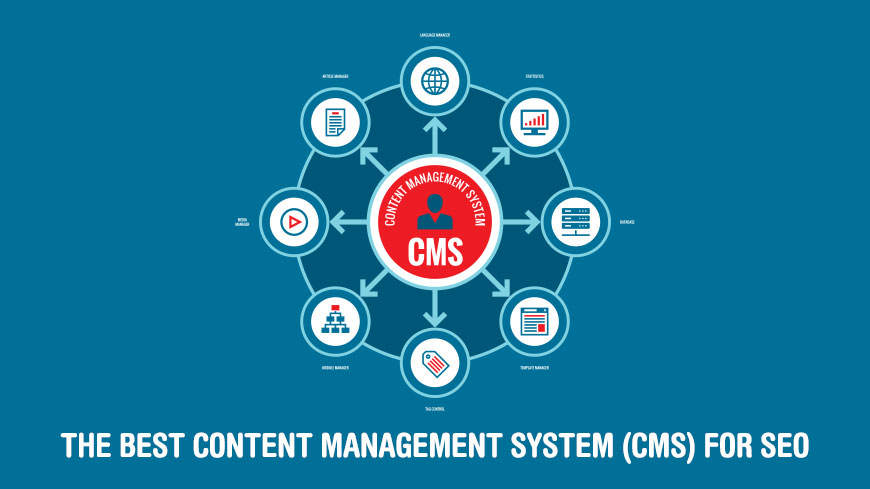
How to Choose a CMS for SEO
SEO matters when picking a CMS, but it’s not the only filter. A platform can have every schema plugin in the world and still be painful to live with day to day. Start with four practical questions, then layer SEO on top.
Can your team actually use it? If your marketers can’t edit a page without a developer, content will pile up and SEO will suffer. Pick a tool that matches your team’s skill level.
How clean is the front-end code? Bloated markup slows pages down and hurts Core Web Vitals. Look for platforms that output minimal, semantic HTML out of the box, not one that relies on dozens of plugins to catch up.
Is it mobile-first and fast? Google has indexed mobile-first since 2019. If the CMS doesn’t produce responsive pages that load quickly, nothing else you do will rescue your rankings.
Does it give you SEO control? At minimum: per-page meta titles and descriptions, canonical tag control, XML sitemaps, 301 redirect management, and structured data support. Anything less, and you’re fighting your CMS every time you publish.

What Makes a CMS SEO-Friendly?
The SEO bar in 2026 is higher than it was even two years ago. Google rewards sites that are fast, accessible, and easy for crawlers to understand. AI search engines like ChatGPT Search, Google AI Overviews, and Perplexity go further and reward structured data they can pull directly into answers.
A CMS worth its salt should handle the following natively or through a well-maintained plugin:
- Metadata control. You need the ability to set the title tag and meta description on every page, plus Open Graph and Twitter Card tags for social sharing.
- Canonical tags. Duplicate content and parameter URLs are routine, and a CMS should let you set a canonical per page to point search engines at the right version.
- Structured data (JSON-LD). Schema markup helps pages earn rich results and AI-generated answers. Native support for BlogPosting, Product, FAQ, and Organization schemas is now table stakes. For definitions of these and other technical terms, see our glossary of essential SEO terms.
- XML sitemaps. Auto-generated, auto-updated, and submittable to Google Search Console.
- Redirect management. The ability to set 301 redirects when URLs change, without editing server config.
- Core Web Vitals performance. Largest Contentful Paint, Interaction to Next Paint, and Cumulative Layout Shift should pass out of the box. Google’s Core Web Vitals guide explains what each metric measures.
- Robots.txt and indexing rules. Granular control over what search engines crawl.
The Best CMS Platforms for SEO in 2026
With those ground rules set, here are ten platforms that handle SEO well in 2026, grouped by the kind of site each one fits. Market data from W3Techs shows how the field stacks up today, but popularity and SEO quality aren’t the same thing. Each pick below has a clear use case.
Open-Source Content Management Systems
Open-source platforms give you maximum control over SEO at the cost of more hands-on work. You own the stack, so you own the optimization.
1. WordPress
WordPress powers roughly 42.5% of all websites and 61% of sites built on any known CMS, according to W3Techs as of April 2026. It’s the default answer for blogs, small business sites, and large content operations alike. After peaking at 43.6% in mid-2025, WordPress has ticked down slightly, marking the first sustained decline in two decades. It still dominates the field by a wide margin.
For SEO, WordPress wins on flexibility. You can run the same optimization plugins the world’s largest content sites use, tweak themes for Core Web Vitals, and publish structured data with a few clicks. Read more on how WordPress rose through the history of SEO.
The modern top SEO plugins for WordPress are:
- Yoast SEO — the long-standing default. Meta editing, schema, sitemap generation, readability checks.
- Rank Math — feature-rich alternative with built-in keyword tracking and Google Search Console integration.
- All in One SEO (AIOSEO) — similar scope to Yoast, with strong sitemap controls and a schema generator.
- SEOPress — a lean, no-ads plugin with comprehensive schema and WooCommerce support.
- The SEO Framework — minimal, fast, no upsells. A good choice if you want clean output without plugin bloat.
WordPress doesn’t force you into any particular editor, hosting stack, or theme, which cuts both ways. Speed and security depend heavily on hosting quality. Pair WordPress with a well-optimized host and a lean theme, and you can compete with anything else on this list.
2. Drupal

Drupal’s overall CMS market share sits near 2% in 2026, down from over 6% a decade ago. But the headline number hides the story. Drupal is over-represented among high-traffic and enterprise sites. It powers 3.1% of the top one million websites and 7.5% of the top 1,000. Government agencies, universities, and Fortune 500 content hubs lean on it for a reason.
Drupal 11 is the current major release. The platform is built for complex content models, fine-grained permissions, and multi-site deployments. Its structured-data support is native, and the core module system gives you granular control over URLs, aliases, and redirects.
The tradeoff is complexity. Drupal has a real learning curve, and most teams hire or contract Drupal specialists rather than self-serve. If your site has tens of thousands of pages, strict editorial workflows, or enterprise security needs, the investment pays off. If you’re running a blog or small business site, this is overkill.
3. Joomla
Joomla sits between WordPress and Drupal in both complexity and market share. The current major release is Joomla 6.1, with Joomla 5.4.5 on the long-term support track. Core SEO features are built in: meta tags, routable URLs, and language support for multilingual sites. But the ecosystem still leans on a few key extensions to hit modern standards.
Sh404SEF is the extension most Joomla sites use to clean up URLs and handle 301 redirects. For sitemaps, OSMap (the successor to the older Xmap) remains a common pick. Multilingual sites often add Falang or stick with Joomla’s built-in language manager.
Joomla’s user base is smaller than WordPress’s, so the plugin and theme selection is narrower. But the core is more structured out of the box, which appeals to developers who find WordPress too loose.
Visual Website Builders
Website builders wrap hosting, design, and SEO into a single subscription. They limit customization compared to open-source tools, but they remove most of the maintenance burden. Their native SEO features have caught up to (and in some cases passed) traditional CMSes.
4. Webflow
Webflow is a visual design tool that outputs clean HTML, CSS, and JavaScript, then hosts the result on AWS-backed infrastructure across more than 100 data centers. That combination of hand-designed layouts plus fast global hosting gives Webflow sites a head start on Core Web Vitals. Many sites pass them with no optimization at all.
On the SEO side, Webflow builds the core tooling directly into the editor: per-page meta titles and descriptions, Open Graph controls, auto-generated XML sitemaps, a 301 redirect manager, and CMS-collection metadata patterns. Schema markup support is thinner out of the box, though Webflow AI can now generate schema blocks for standard page types, and custom JSON-LD can be embedded per page.
Webflow is the pick for design-first marketing sites where the team wants independence from developers. The learning curve for the visual editor is real but manageable. Once set up, marketers can ship pages without breaking the design system.
5. Wix
Wix has transformed from a beginner’s website builder into a surprisingly capable SEO platform. The Wix SEO Wiz walks new sites through the technical basics step by step, and structured data is now applied automatically to product pages, blog posts, forum threads, events, and booking pages.
Wix also generates structured data with AI for custom blog posts. The system reads the content and produces relevant JSON-LD, then refreshes it when the post is updated. Manual JSON-LD is supported for cases the presets don’t cover, up to 7,000 characters per page. Meta controls, canonicals, sitemaps, and SSL are all baked in.
The limits are URL structure (less flexible than WordPress or Webflow) and an ecosystem tightly coupled to Wix’s own tools. For small businesses and personal brands that want a managed experience, though, Wix is one of the fastest ways to get a real SEO foundation up.
6. Squarespace
Squarespace has quietly become a strong SEO platform. Independent testing shows roughly 70% of Squarespace sites pass Google’s Core Web Vitals, well above the web-wide average of about 54.6%. That performance comes for free, no tuning required.
Every Squarespace site ships with clean HTML, auto-generated sitemaps, editable title tags and meta descriptions per page, alt-text fields on images, and a built-in SEO Report tool that flags missing metadata. Google Search Console integration is a few clicks. Structured data is applied automatically for common page types.
Where Squarespace falls short is depth. There’s no native keyword research, no broken-link audit, and no automated site audit. You’ll want an external tool paired with it to catch issues at scale. But for creative professionals, small businesses, and portfolio sites, Squarespace covers the essentials without the plugin churn of WordPress.
E-Commerce Platforms
E-commerce sites need specialized SEO: product schema, faceted navigation, category hierarchies, and inventory-driven canonicals. General-purpose CMSes handle this poorly without heavy customization. Two platforms lead the category in 2026.
7. Shopify
Shopify is the default pick for small to mid-sized online stores. The platform handles the technical SEO basics automatically: canonical tags on every page (critical for avoiding duplicate-content issues across collections and variants), an auto-generated XML sitemap at /sitemap.xml, SSL on every store, and a built-in URL redirects tool for when products or collections change URLs.
Product, Collection, and Article schemas are applied by default on Shopify-owned themes. 2026 brought deeper AI-search optimization features, including support for conversational-search metadata and richer product structured data.
The limit that matters most for SEO is URL structure. You can’t change the /collections/ or /products/ URL prefixes, which forces a specific taxonomy on every Shopify store. For most sites, that’s fine. For large catalogs or multi-brand operations, it can be restrictive.
8. Adobe Commerce (Magento)

Adobe Commerce, formerly Magento, is the enterprise pick for e-commerce. Adobe acquired Magento in 2018 and rebranded the commercial edition in 2021. Pricing reflects that positioning: Adobe Commerce starts at roughly $22,000 per year for the on-premise edition and climbs past $200,000 per year for the cloud PaaS version, billed on gross merchandise volume.
Magento Open Source, the free self-hosted edition, remains available and widely used. You still pay for hosting, development, and extensions (typically $5,000 to $90,000 per year depending on store complexity), but the core software is free.
Both versions give you deep SEO control: per-product meta, canonical URL management, dynamic XML sitemaps, layered-navigation URL rules, and native multi-store support. The platform is built for large catalogs, merchant workflows, and integrations with GA4 and third-party analytics.
The MageWorx SEO Suite and Mirasvit Advanced SEO Suite remain the popular paid extensions in 2026 for teams that want additional automation around canonical tags, hreflang, and rich snippets.
Modern Publishing & Headless CMS
The newest category in the CMS lineup splits into two shapes. Publishing-first tools like Ghost put writers and newsletters at the center. Headless CMSes separate content storage from presentation entirely. Content lives in an API, and any frontend consumes it.
9. Ghost
Ghost is an open-source publishing platform founded in 2013 by John O’Nolan and Hannah Wolfe, both former WordPress employees. It started as a response to WordPress’s growing complexity, and the focus has stayed sharp: publishing, newsletters, and memberships.
For SEO, Ghost ships with clean Handlebars-based themes, native sitemap generation, editable per-post meta and social cards, and strong Core Web Vitals out of the box. Structured data is built in for articles and authors. The platform is fast because the stack is narrow — no plugin ecosystem means no plugin bloat.
Ghost 6.0, released in August 2025, added ActivityPub support, letting Ghost sites syndicate content to Mastodon, Bluesky, and the broader Fediverse automatically. For publishers building audiences outside algorithmic social platforms, this matters.
Pricing: Ghost(Pro) hosted plans start at $15 per month, or you can self-host the open-source software for free. The platform fits newsletter-led publishers, independent journalists, and creator businesses. It’s not a general-purpose website tool.
10. Hygraph
Hygraph (formerly GraphCMS) represents the headless side of the 2026 CMS market. There’s no built-in frontend. Content lives in a GraphQL API, and your team builds whatever frontend consumes it, typically with Next.js, Astro, Nuxt, or a similar modern framework.
The SEO advantage of headless is speed. When content is statically rendered or served from a CDN, Core Web Vitals tend to be excellent. Schema, meta tags, and sitemaps are generated on the frontend side, which means you control them completely. The flip side: you’re also responsible for getting them right.
Hygraph is a good fit for teams that already have frontend developers and want maximum flexibility: multi-site content reuse, complex content models, and API-driven integrations. It’s not for teams looking for drag-and-drop editing or out-of-the-box SEO.
Other credible headless options in 2026 include Sanity, Contentful, Storyblok, and Payload CMS. All are API-first, and all share the same SEO tradeoff: the CMS itself doesn’t determine your rankings. Your frontend does.
Frequently Asked Questions
Is WordPress really the best CMS for SEO?
For most teams and most sites, yes. Analysis of 59,000-plus top-ranking domains in 2025 found WordPress powers about 49% of them, roughly matching its overall market share. The plugin ecosystem (Yoast, Rank Math, and similar) gives even novice users access to enterprise-grade SEO tooling. That said, “best” depends on your use case. E-commerce sites often do better on Shopify. Design-heavy marketing sites often do better on Webflow. Newsletter-led publishers do better on Ghost.
Do headless CMSs rank better than WordPress?
Not inherently. Headless stacks usually win on Core Web Vitals because statically rendered pages load fast, but ranking depends on content quality, schema, internal linking, and backlinks just as much on a headless site as on WordPress. A well-optimized WordPress site with good hosting and caching competes with most headless setups. The difference is how much of the SEO work your team has to do by hand.
Is Webflow or WordPress better for SEO?
It depends on team structure. Webflow passes Core Web Vitals out of the box more often, and its SEO controls are native rather than plugin-based. WordPress offers more flexibility, a larger plugin and theme ecosystem, and no per-site subscription cost. Design-led marketing teams without in-house developers usually prefer Webflow. Content-led sites, blogs, and businesses running at scale usually stick with WordPress.
What CMS do most top-ranking websites use?
Per Rankability’s 2025 analysis of 59,033 top-ranking domains, WordPress leads the field with roughly 49% of sites, followed by proprietary and custom stacks, then Shopify (dominant among e-commerce results). Drupal and Squarespace each account for a few percent. The pattern holds globally: popular CMSes with active plugin ecosystems tend to do well because they give site owners the tools to execute on SEO, not because the platform itself is magic.
Bottom Line
The best CMS for SEO isn’t a single product. It’s the platform that gives your team control over metadata, schema, Core Web Vitals, and redirects without fighting you at every step.
For most blogs, small business sites, and content-led publishers, WordPress remains the default right answer. Design-first marketing sites are usually better served by Webflow. Online stores should start with Shopify and graduate to Adobe Commerce only when volume demands it. Newsletter-led publishers should look hard at Ghost. Teams with frontend developers and complex content models can consider a headless stack like Hygraph.
Whatever you pick, the CMS choice is the foundation, not the whole building. Once your platform is in place, map your content, audit it regularly, and keep it aligned with what your audience is actually searching for. That’s where tools like DYNO Mapper come in.