

What Card Sorting Is
Card sorting gives users a chance to show you how they would categorize your content. Each topic is written on a card (physical or virtual), and participants group the cards in a way that feels natural to them. In some studies, they also label the groups they create.
The point is to surface the mental model your audience brings to your site. If your navigation matches that mental model, people find what they need. If it does not, they bounce. Card sorting is one of the cheapest, fastest ways to test that fit before you commit to a navigation, a taxonomy, or a redesign.
The technique started with paper cards on tables. Today most studies run online, with software that handles randomization, recruits remote participants, and produces a similarity matrix or dendrogram you can analyze in minutes. Both formats still have value, and we cover both below.
You can run a card sort to plan a new structure, evaluate an existing one, or recover after a redesign that did not land. It works for marketing sites, intranets, documentation, e-commerce categories, mobile app menus, and even physical wayfinding.
Open Card Sorting
In an open card sort, participants group the topics in any way they like and label each group themselves. Open sorts are generative: you learn how users think about a topic space and how they describe each category in their own words.
This is the right technique when you are designing a new section, planning a redesign, or working with content that has never been organized for end users. The labels people invent often beat the ones you would have written, because they reflect the language your audience already uses.
Some platforms also let participants create subcategories, which is useful when your site needs more than one level of hierarchy. A category like “Company” might benefit from sub-items for About, Careers, Contact, and Press, so the menu can expand into a dropdown rather than dump everything on one page.
Closed Card Sorting
In a closed card sort, you provide the categories and participants drop each topic into the category they think it belongs to. They cannot rename the categories or invent new ones.
Closed sorts are evaluative. They are the right choice when you already have a proposed taxonomy and want to test whether users would interpret it the same way you do. They are also useful when the category names are not negotiable, for example when they are set by a parent organization, a legacy structure, or a brand framework.
Closed sorts run faster than open sorts because there is less for participants to do, so they are a good fit when you have a tight time window or want to test more topics at once.
Hybrid Card Sorting
Hybrid card sorting combines the two. Participants see a starter set of categories you have provided, but they can also rename them, merge them, or create their own. It captures the structure you have in mind while still letting users push back when something does not fit.
Hybrid sorts are useful when you have a working taxonomy but want to stress-test it before launch. They give you the validation of a closed sort and the surprise findings of an open one in a single session.
Card Sorting Techniques
One-on-One Card Sorting
One-on-one sessions involve a single participant and a facilitator. The facilitator can be you, a teammate, or an external researcher. The format gives the participant room to think out loud, and gives the facilitator a chance to ask why a card landed where it did.
The narration is often more valuable than the final groupings. People second-guess themselves, hesitate over ambiguous cards, and sometimes argue themselves into a different category. Capturing those moments helps you understand which labels are confusing or which content is genuinely hard to place.
Most remote tools support a similar effect through optional comment fields next to each card or each group, so participants can leave notes as they go.
Independent Group Sorting
In an independent group sort, several participants work at the same time but each one sorts alone. A single facilitator can brief the room or post the instructions, then collect each person’s results at the end.
This format is efficient. You gather data from a dozen people in the time a single one-on-one session would take. It works in person, in a remote moderated session, and in unmoderated online studies where every participant completes the same study independently.
Integrated Group Sorting
An integrated group sort is collaborative. Participants split into pairs or small groups of two or three and sort the cards together, debating categories and reaching a shared answer. The facilitator listens for reasoning, intervenes when one person dominates, and asks each group to walk through their final structure.
This works best in person, where the discussion is part of the value. It is also possible in real-time remote sessions on a virtual whiteboard, but you need to keep groups small enough that everyone gets airtime.
Remote Unmoderated Sessions
Remote unmoderated sorts are now the default for most teams. Participants complete the study on their own time, in their own environment, on whatever device they prefer. You skip the scheduling, skip the venue, and the software analyzes the results for you.
The trade-off is that you lose the live narration. Modern tools mitigate this with comment fields, post-task questions, and screen recordings, but a remote unmoderated sort will not match a moderated session for depth of qualitative insight. It will beat one for sample size and turnaround time.
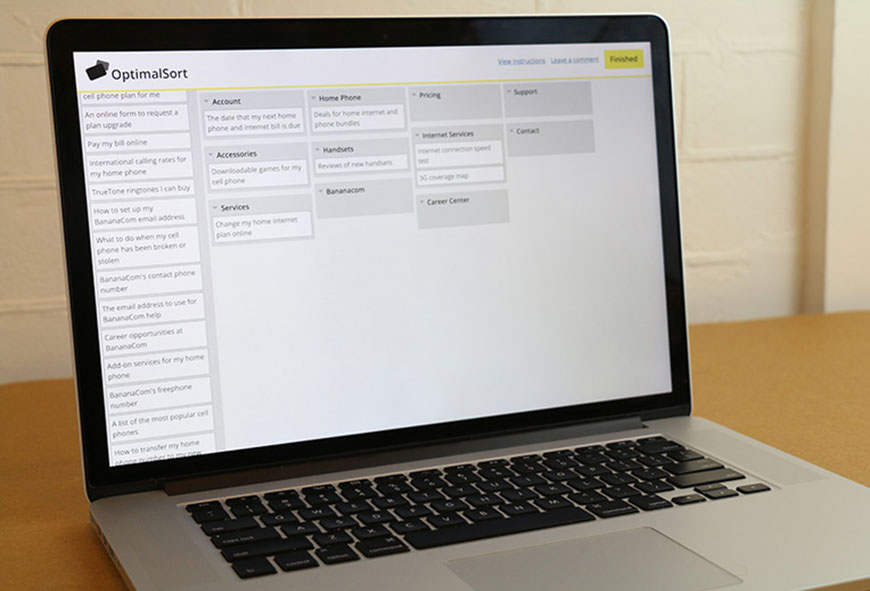
Most online platforms now work on phones and tablets as well as desktops, so you are not forcing participants to sit at a computer. For a quick look at what an analyzed open sort looks like, see the example matrix below.
Card Sorting vs. Tree Testing
Card sorting is generative. It tells you how users would group your content. Tree testing is evaluative. It tells you whether users can actually find specific items in a structure you propose. The two methods complement each other, and most modern IA work uses both.
The standard pattern: run a card sort first to discover how your audience thinks. Use the results to design a draft information architecture. Then run a tree test against that draft to see if people can complete real findability tasks. If the tree test surfaces problem areas, refine the structure and test again. Nielsen Norman Group has a clear breakdown of when each method earns its keep.
Most card sorting platforms also include tree testing, so you do not need to switch tools between phases. Pairing them gives you a much stronger case for the structure you eventually ship.
How Many Participants You Need
This is the question every researcher asks first, and the answer is smaller than you might expect. Research from Nielsen Norman Group shows that 15 participants gets you a 0.90 correlation with the “true” result, and 30 participants pushes that to 0.95. Beyond 30, you are paying a lot for very little extra signal.
Practical guidance:
15 participants is a reasonable floor for a single user group when you are looking for patterns rather than statistical significance.
30 or more when you need quantitative confidence, want to compare segments, or plan to publish the numbers.
15 per segment if your audience splits into distinct groups (admins vs. end users, new vs. returning, etc.) that you suspect will categorize differently.
Card count matters too. Aim for 30 to 60 cards in a single study. Below 30, you may not have enough range to see meaningful clusters. Above 60, fatigue sets in and the later cards get sorted carelessly. If you have more topics than that, split the study into themed rounds.
Getting Started
Whether you run an open, closed, or hybrid sort, and whether you do it in person or remotely, the prep work is the same.
Pick your medium first. Online studies handle randomization, recruitment, and analysis for you. Physical cards still have value for kickoff workshops with a small team. If you go physical, use thick card stock so the cards survive being shuffled and re-sorted.
Choose your topics. Aim for 30 to 60 cards. Each card should describe a single piece of content, feature, or task in a few words. Avoid using the same word in multiple cards, since participants will sort by the shared word instead of thinking about meaning.
Number your cards. A simple numbered spreadsheet (card ID, label, source page) makes analysis far easier later, especially for physical studies where you have to log results by hand.
Write a clear brief. Tell participants what the study is about, that there are no wrong answers, and roughly how long it should take. If you have a time limit, say so. A vague brief produces noisy data.
Recruiting Participants
Recruiting is much easier remotely. Most card sorting platforms include panel access, so you can target people by role, location, or experience and have results within a day. If you have an in-house list, you can also email a study link to current users.
For in-person sessions, look first at people who already use your product. Walk-in customers, on-site clients, and conference attendees are natural candidates. A small incentive (gift card, branded swag, donation in their name) lifts response rates without skewing the data.
Match the participants to the audience you are designing for. A site for compliance officers will not be served by sorting it with college students, no matter how convenient the recruiting. If your real users are specialists, recruit specialists.
Running the Session
Whether the session is online or in a meeting room, the brief you wrote during prep does most of the work. Read it aloud at the start of in-person sessions and pin it next to the cards on remote ones. Reassure participants that there are no wrong answers, since hesitation hurts the data more than any wrong-feeling sort.
For in-person sessions, refreshments help. They signal that you appreciate the time, and they keep energy up across a session that can run 30 to 60 minutes.
For remote sessions, double-check the study before you launch it. A missing card label, a typo in the brief, or a broken category in a closed sort can quietly invalidate the first dozen responses before you notice.
Capturing Results
In remote unmoderated studies, the platform captures everything: card placement, time on task, and any comments. Export the raw data as soon as the study closes so you have a backup outside the tool.
For in-person sessions, record the process when you can. A phone propped on a stand catches the table, and a debrief at the end gives you a chance to ask why ambiguous cards landed where they did. If recording is not possible, log results card by card with the numbers you assigned during prep.
An end-of-session questionnaire helps in either format. Ask which cards felt hard to place, which categories felt obvious, and what was missing. These three questions surface the highest-value findings of any sort.
Analyzing the Data
Modern card sorting tools do most of the heavy lifting. The two outputs you will use most often are the similarity matrix, which shows how often any two cards were grouped together, and the dendrogram, which clusters cards by similarity into a tree-shaped diagram you can read top down.
Whatever tool you use, work through the same checklist:
Find the strong groupings. Cards that participants consistently put together (high agreement scores or short dendrogram branches) are the spine of your IA.
Spot the contested cards. Cards that landed in three or more different categories often need clearer labels, or they belong in more than one place and you need to decide which is canonical.
Read the labels participants invented (open sorts only). Recurring vocabulary is gold for navigation labels and search-term research.
Look for cards that traveled. A card that no two participants categorized the same way usually means the underlying content needs to be split, merged, or rewritten before it lands in your IA.
Read the comments. Anything participants wrote in the optional comment fields is qualitative ground truth. It often catches issues the numbers miss.
Once you have a draft IA built from the sort, validate it with a tree test before you commit. The combination is the closest thing UX has to a reliable IA workflow.
Card Sorting Tools to Know
Four platforms cover most of the market in 2026:
Optimal Workshop OptimalSort is the long-time leader, with strong analysis tools and a paid recruitment panel.
UXtweak offers open, closed, and hybrid sorts plus tree testing in a single suite, often at a friendlier price point.
Maze bundles card sorting with prototype testing and is popular with design teams that already use it for usability studies.
Lyssna (the platform formerly known as UsabilityHub) is built for speed when you need a sort up and running in minutes.
For collaborative real-time sessions, virtual whiteboards like Miro and FigJam work well in workshops, even though they do not generate dendrograms the way dedicated tools do. For a deeper comparison and several more options, see 10 Card Sorting Tools for Surveying Information Architecture.
Common Mistakes to Avoid
Sorting too many cards. Past 60, fatigue dominates and the data degrades. Split the topics into rounds instead.
Recruiting the wrong audience. A sort done with people who do not match your real users tells you something interesting, but it is not your IA.
Skipping the tree test. An IA built from a card sort looks great on paper. Real users on real tasks will surface findability problems a sort never could.
Treating the dendrogram as an answer. Cluster diagrams are one input. Combine them with comments, agreement scores, and qualitative judgment about your content.
Designing labels by committee. Use the language participants used, not the language a stakeholder prefers. Internal politics is the fastest way to undo a good sort.
Frequently Asked Questions
When should I run an open sort vs. a closed sort?
Open sorts when you do not yet have a structure, or when you are redesigning and want fresh thinking. Closed sorts when you already have a draft IA you want to validate. Hybrid sorts when you have a draft but want to see what users would change.
How many people do I really need?
Fifteen is a reasonable floor and the point at which results stabilize for a single user group. Thirty is the sweet spot for quantitative confidence. Beyond 30, the marginal value drops sharply.
Is remote card sorting as good as in person?
Remote unmoderated sorts win on sample size, recruitment speed, and automated analysis. In-person sessions win on the qualitative narration around why participants made their choices. For most teams, remote with comment fields hits the right balance, supplemented by a few moderated sessions when budget allows.
How does card sorting compare with tree testing?
Card sorting is generative; tree testing is evaluative. Card sorting answers “how would users group this content?” Tree testing answers “can users find this content in the structure I built?” Use both. Sort first to shape the IA, tree test second to validate it.
Bottom Line
Card sorting is the cheapest way to learn how your audience thinks about your content, and the highest-leverage investment you can make before a navigation, taxonomy, or redesign decision. Pick the sort type that matches your stage (open, closed, or hybrid), recruit at least 15 of the right people, run the study with a clear brief, analyze with both clusters and comments, then validate the resulting IA with a tree test. Do that and your site will feel obvious to use, which is the highest compliment a navigation can earn. For more on putting the results to work, see Information Architecture Best Practices, What is the Difference Between Navigation and Information Architecture, and 22 Awesome Information Architecture Tools for Creating Visual Sitemaps. For deeper methodology references, Nielsen Norman Group’s primer and MeasuringU’s overview are both worth bookmarking.